Notatka opisuje kilka optymalnych algorytmów kompresji stosowanych do tworzenia archiwów. W szczególności pełniących rolę kopii zapasowej lub nośnika danych przekazywanych innym.
Aktualną wersję w formacie PDF możesz pobrać tu: [PDF]
Motywacja
Najczęściej stosowane algorytmy kompresji danych w systemach z rodziny
UN*X takie jak bzip2 i gzip ze względu na swój wiek stały się
nieefektywnym narzędziem archiwizacyjnym. Wprowadzenie na początku lat
2000 nowocześniejszych metod kompresji opartych o algorytm LZMA
umożliwiło drastyczne (nawet do 70%) zmniejszenie przestrzeni dyskowej
koniecznej do przechowywania tej samej ilości danych. Niesie to ze
sobą możliwości obniżenia zarówno kosztów przechowywania danych, jak i
obniżenia wagi szkodliwych substancji, które emitowane są do
środowiska podczas ich transferu. Według uśrednionych szacunków
pochodzących z
badań[1][2] przesłanie 1MB danych generuje około 10g CO2.
Proponowane metody kompresji
LZIP
Lzip jest algorytmem dostępnym na zasadach Powszechnej Licencji
Wolnego Oprogramowania GNU (GPL). Został wdrożony do powszechnego
użytku przez dystrybucje systemu GNU/Linux takie jak GNU Guix i Dragora;
organizację IANA, która wykorzystuje go do dystrybucji bazy informacji o
strefach czasowych oraz Parlament Europejski, który z jego
wykorzystaniem publikuje zrzuty swojej bazy danych w formacie JSON.
Podstawowa implementacja lzip nie posiada obsługi wielu wątków
procesora, wydłużając tym samym czas kompresji i dekompresji
przetwarzanych danych. W repozytoriach wielu dystrybucji udostępniono
pakiet plzip, który pozwala na równoległą kompresję archiwów z
wykorzystaniem wielu wątków procesora.
Wśród narzędzi konsumenckich algorytm ten jest obsługiwany przez
narzędzie kompresji środowiska graficznego GNOME, Midnight Commander
oraz zmodyfikowaną wersję archiwizatora
7-zip dostępną również na
platformę MS Windows.
Przykłady zastosowania
By skompresować dane za pomocą lzip stosujemy komendę:
tar cv katalog_z_danymi | lzip -c -f - > archiwum.tar.lz
Archiwum to możemy rozpakować za pomocą komendy:
tar xf archiwum.tar.lz
Stosując kompresję wielowątkową z plzip dobrze jest unikać mieszania
z jednowątkowym tar, dlatego też kompresję wykonamy za pomocą komend:
Jest to algorytm opracowany przez pracowników Facebooka i opublikowany
na zasadach licencji Otwartego Oprogramowania BSD. Wśród wdrażających
go organizacji znajdziemy dystrybucję systemu GNU/Linux
Archlinux. Jest on również rozważany jako domyślny format kompresji
archiwów *.deb dystrybucji GNU/Debian i Ubuntu.
W repozytoriach dystrybucyjnych obecny jest jako pakiet zstd.
Przykład zastosowania
W celu utworzenia archiwum z wykorzystaniem zstd wykonujemy komendę:
Podobnie jak algorytm Lzip, obsługiwany jest przez narzędzie
archiwizacyjne środowiska GNOME, zmodyfikowaną wersję 7-zip oraz bazy
danych AWS Redshift i RocksDB.
By uzyskać siłę kompresji archiwum porównywalną z zaprezentowanymi
wcześniej algorytmami, kompresję z wykorzystaniem 7zip przeprowadzimy
za pomocą komendy:
tar cv katalog_z_danymi | 7z a -t7z -m0=lzma -mx=9 -mfb=64 -md=32m -ms=on -si archiwum.tar.7z
Archiwum dekompresujemy wywołując:
7z x archiwum.tar.7z
tar xf archiwum.tar
Porównanie skuteczności kompresji
Dla paczki logów osiągi wymienionych wcześniej komend prezentują się następująco:
Kompresji do archiwum gzip dokonano z wykorzystaniem komendy:
tar cv katalog | gzip --best > archiwum.tar.gz
Pozostałe uwagi
Należy zauważyć, że ewentualne wdrożenie opisywanych algorytmów do kompresji logów odkładanych na serwerach może skutkować utratą kompatybilności z narzędziami takimi jak zcat, bzcat oraz fgrep, służącymi do szybkiego ich przeglądania i przeszukiwania z uwzględnieniem paczek po rotacji.
Ministerstwo Cyfryzacji pracuje nad kolejną appką mającą wspomóc walkę z pandemią COVID-19 w Polsce. Dokładnie, by powrót do normalnego życia po zakończeniu okresu „narodowej kwarantanny” był bezpieczny. Zanim przeczytasz resztę tego tekstu zachęcam do przeczytania ogłoszenia na stronie MC.
Bardzo, bardzo, bardzo chwali się otwarcie kodu. Przed laty intensywnie lobbowaliśmy to jako Fundacja Wolnego i Otwartego Oprogramowania (FWiOO). Fajnie, że w końcu się dzieje. Niestety ten fakt, sam z siebie, nie gwarantuje ani bezpieczeństwa, ani zaufania.
Cel aplikacji, jest kontrowersyjny. Z drugiej strony czas pandemii zaczął już przyzwyczajać do bezkompromisowego naruszania naszej prywatności. O ile w Polsce ta inwigilacja nie jest jeszcze jakoś bardzo zaawansowana, to na świecie wprowadzają ją bezpardonowo.
W teorii rozwiązanie nie brzmi źle i ma predyspozycje bycia fair w stosunku do użytkownika. Warunkiem jest, aby rzeczywiście żadne dane identyfikujące nie były przesyłane na serwery. Słabym punktem wszelkich tego typu rozwiązań jest ich dystrybucja za pomocą sklepów takich jak App Store czy Google Play. Wprowadzają one do całego łańcucha pomiędzy kodem w repozytorium na githubie, a użytkownikiem elementy wymagające od nas zaufania do tych, którzy odpowiedzialni są za przygotowanie paczki i umieszczenie jej w sklepach. Musimy im, ich szefom oraz szefom tych szefów zawierzyć, że po zgarnięciu kodu z repo nie dodają nic, co mogłoby dodatkowo zbierać informacje o użytkownikach i przekazywać je do serwerów ministerstwa.
Oczywiście powyższe ma zastosowanie, gdy kod będzie sprawdzony przez niezależnych programistów i specjalistów, a Ci powiedzą, że rzeczywiście realizuje on przedstawione przez autorów założenia w sposób bezpieczny.
Jest kilka metod na zbudowanie takiego zaufania, ale każda z nich wymaga pewnej biegłości technicznej. W pierwszym przypadku po wystawieniu przez ministerstwo appki w sklepach, ktoś pobiera je i generuje ich sumy kontrolne (z uwzględnieniem dodawanych w procesie publikacji sygnatur). Jest to ciąg znaków unikalny dla zawartości danego pliku. Nawet najdrobniejsza jej zmiana skutkuje uzyskaniem zupełnie innej sumy kontrolnej. W drugim kroku osoba taka pobiera kod appki z repozytorium na githubie i samodzielnie buduje go, zgodnie z udostępnioną przez autorów instrukcją, by uzyskać taki sam plik, który umieszczony może być w sklepie i na urządzeniu mobilnym. Jeśli suma kontrolna samodzielnie skompilowanej aplikacji oraz tej pobranej ze sklepu są identyczne, wtedy mamy pewność, że nic po drodze do naszego urządzenia nie zostało do niej dodane.
Sam zdecydowałbym się na zostanie użytkownikiem ProteGo tylko pobierając ją właśnie z FDroida.
Drugą częścią kontrowersji tego pomysłu ministerstwa jest potrzeba odpalonego wciąż modułu bluetooth. Wyłączenie zarówno jego, jak i pozostałych czujników (NFC, WiFi, 3/4G), gdy tylko nie są nam potrzebne jest jednym z podstawowych zaleceń bezpiecznego korzystania ze smartfona. Technologia Bluetooth posiada wiele dziur, a nie wszystkie z nich załatać można poprzez aktualizację oprogramowania (firmware), część z nich wymaga wymiany modułu sprzętowego w telefonie na nowszy.
Zdecydowana większość użytkowników smartfonów posługuje się starszymi ich modelami, wrażliwymi na takie zagrożenia. Znikome ich grono jest w stanie samodzielnie dokonać wymiany modułu na nowszy, bez zakupu nowego urządzenia. Zastosowanie ProteGo zgodnie z zamysłem ministerstwa niestety spowoduje, że Polacy będą chodzić po ulicach i siedzieć w swoich domach czy biurach z otwartymi furtkami dla cyberprzestępców w kieszeniach.
Jest to zmiana zależna od czasu synchronizacji przeglądarki z serwerami Mozilli, w związku z tym może ona następować z opóźnieniem, bądź nie nastapić wcale jeśli sprawdzenie nastąpi po rozwiązaniu problemu przez Mozillę. Z dotychczasowych obserwacji wynika, że dotyczy ona użytkowników Mozilla Firefox oraz Tor Browser.
Wtyczki wyłączane to między innymi:
uBlock (blokowanie reklam);
NoScript (blokowanie wykonywania skryptów javascript na stronach);
Decentraleyes (ochrona przed śledzeniem przez serwery udostępniające biblioteki CSS i javascript);
AdBlock (podobnie jak uBlock, jednak jego używanie jest obecnie odradzane);
PrivacyBadger (blokowanie połączeń odwiedzanych stron z serwerami śledzącymi naszą aktywność).
Jeśli nasze korzystanie z internetu za pomocą przeglądarki Firefox jest chronione, którymś z wyłączonych dodatków rekomenduję tymczasowo wstrzymać się z wykonywaniem wrażliwych działań w internecie (facebook, odwiedzanie bankowości elektronicznej bez ręcznego wpisywania jej adresu, zakupy w internecie, logowanie się do odwiedzanych serwisów) oraz nie klikać w nie odwiedzane do tej pory adresy. Wszystkie dotychczasowo blokowane szkodliwe skrypty są uruchamiane w naszych przeglądarkach).
Jeśli musimy, któreś z tych działań wykonać, to wspomniane dodatki wciąż działają w przeglądarkach Google Chrome oraz Chromium.
Tymczasowe rozwiązanie problemu polega na ręcznym wyłączeniu sprawdzania wadliwego certyfikatu. W tym celu wpisujemy w pasku adresu about:config, potwierdzamy, że wiemy co robimy. Następnie wyszukujemy klucz „xpinstall.signatures.required” i zmieniamy jego wartość na false za pomocą dwukrotnego kliknięcia lewym przyciskiem myszy. Zmiana zachodzi od razu i nie wymaga restartu przeglądarki.
Należy jednak pamiętać, by wykonać ją ponownie, gdy problemy z dodatkami ustąpią. Pozostawienie jej na stałe skutkować będzie obniżeniem bezpieczeństwa naszego użytkowania w przyszłości.
Opisywane problemy powinny zostać rozwiązane w najbliższym czasie (dzień, góra dwa ze względu na różny czas synchronizacji wspomnianego wcześniej certyfikatu)
Popularną formą spamu i próby wyłudzenia pieniędzy stają się wiadomości, których odczyt potrafi nam na chwilę zmrozić krew w żyłach. Mimo tego, że przywykliśmy do rozpoznawania oznak fałszywych wiadomości, ta może w pierwszej chwili wydawać się prawdziwa. Dzięki uzupełnieniu naszego „arsenału weryfikacyjnego” o sprawdzenie nagłówków wiadomości nauczymy się w sposób decydujący potwierdzać autentyczność otrzymanego maila.
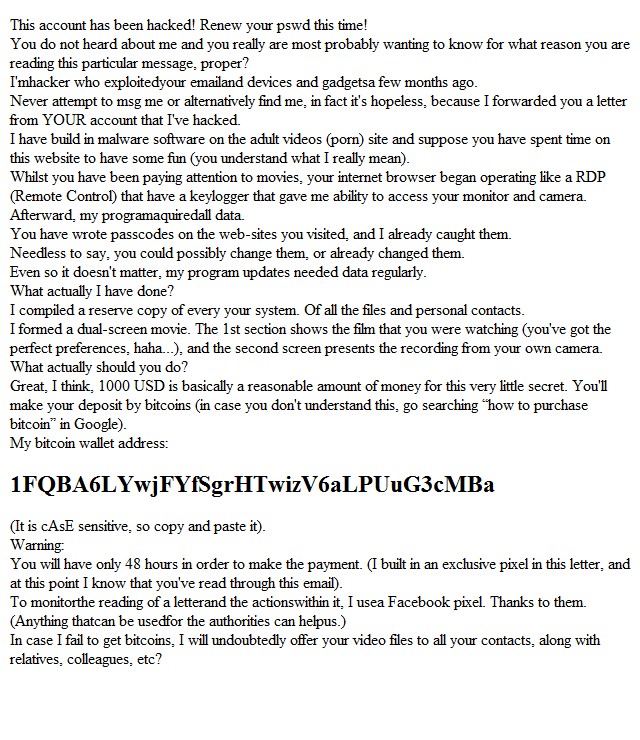
Jak wygląda taka wiadomość? Pierwszy email, z którym się zderzyłem przyszedł w języku angielskim:
Cechy charakterystyczne takiej wiadomości to:
adres, z którego przyszła jest naszym adresem email. Spokojnie – to tylko pozory;
tytuł zawiera nasze imię bądź nazwisko, tu tez możemy być spokojni, w dobie mediów społecznościowych, dzięki którym można o nas dowiedzieć się naprawdę wiele, nie powinno nas to już zaskakiwać. W wersjach polskich częściej znajdziemy coś o tym, że nasze konto zostało zhakowane;
w treści wiadomości znajdziemy informację o tym, że nasze urządzenia zostały zainfekowane i przejęte, a my zostaliśmy nagrani podczas oglądania treści pornograficznych (zarówno ekran, jak i kamerka);
wiadomość zawiera identyfikator portfela Bitcoin, na które musimy przelać wskazaną kwotę w ciągu 48 godzin. W przeciwnym wypadku nagrania zostaną rozesłane do naszych kontaktów;
przechwałki autora dotyczące jego umiejętności śledzenia losów wiadomości i naszych działań.
Wersja polska wiadomości, która pojawia się dość często jest dodatkowo uwiarygadniana całkiem poprawną polszczyzną:
Cześć,
Gdybyś był bardziej czujny podczas zabaw ze sobą, nie napisałbym wiadomości do Ciebie. Nie sądzę, że zabawy ze sobą są niezwykle straszne, ale kiedy wszyscy koledzy, krewni i przyjaciele otrzymają nagranie wideo, jest to oczywiście dla ciebie co będzie. Umieściłem wirusa na odwiedzonej stronie porno. Gdy obiekt naciśnie przycisk odtwarzania, urządzenie rozpocznie nagrywanie ekranu i wszystkie kamery w urządzeniu zaczną działać.
Co więcej, mój wirus tworzy zdalny pulpit z funkcją keyloggera z twoim urządzeniem, więc mogłem zebrać wszystkie kontakty z twojego e-maila, komunikatorów i innych sieci społecznościowych. Piszę na adres e-mail, ponieważ jest to twój roboczy adres, więc powinieneś to sprawdzić.
Jeśli chcesz usunąć wszystkie zebrane dane, wyślij mi 1000$ w BTC (kryptowaluta).
To jest mój portfel Bitcoin: 17e3RHmohKBvkbrTN9QTeuXdnkDnk6Eriu
Masz 48 godzin po przeczytaniu tego listu. Zegar tyka od momentu otwarcia wiadomości.
Nie wiesz, jak uzupełnić portfel Bitcoin? W dowolnej wyszukiwarce napisz “jak przesłać pieniądze do portfela btc”. To łatwiejsze niż wysłanie pieniędzy na kartę kredytową!
Po twojej transakcji usuwam wszystkie twoje dane. W przeciwnym razie wyślę wideo z twoimi figlami do wszystkich twoich kolegów i przyjaciół chyba wiesz jak łatwo Ciebie znaleźć w sieci!!!
Od teraz bądź ostrożny! Odwiedź tylko bezpieczne strony!
Pierwsza z wiadomości przyszła na skrzynkę prywatną. W takim wypadku czytając ją, by nie dać nadto ponieść się emocjom, możemy zrobić sobie krótki „rachunek sumienia” – czy rzeczywiście oglądaliśmy porno lub wykonywaliśmy inne opisane w treści czynności, czy mamy zaklejoną kamerkę? Najczęściej strach związany z autentycznością włamania kończył się na zaklejonej kamerce. Co raz więcej z nas to robi.
Drugi mail trafił na skrzynkę firmową, z której może korzystać więcej niż jeden pracownik. Tu dodatkowym czynnikiem podnoszącym nam ciśnienie może być fakt, że nie wiemy co robili pozostali pracownicy, bądź wiemy, że ich praktyki dotyczące bezpiecznego posługiwania się technologiami nie są najlepsze. Publikacja nagrań kogoś kojarzonego z naszą firmą może mieć wpływ nie tylko na jego prywatny wizerunek, może też zrujnować to jak postrzegane jest nasze przedsiębiorstwo.
W obu przypadkach czytając wiadomość powinniśmy zachować zimną krew i nie panikować. Jeśli masz wśród znajomych jakiegoś rodzaju informatyka albo kogoś trochę rozeznanego w tej dziedzinie skonsultuj się z nim. W firmie dobrym powiernikiem tego problemu będzie dział IT. Tu nie musisz się przejmować, wstydzić czy z czegokolwiek tłumaczyć w związku z opisanymi w wiadomości prywatnymi poczynaniami. Widzieliśmy już wiele takich wiadomości – dobrze, że zachowujesz czujność i pytasz.
Sprawdzanie nagłówków wiadomości
Możemy też samodzielnie sprawdzić i upewnić się, że taka wiadomość jest jedynie kolejnym spamem. Do tego celu musimy posłużyć się funkcją obecną w większości klientów poczty elektronicznej: pokaż nagłówki. Jest to funkcja, którą znajdziemy nie tylko w Outlooku czy Thunderbirdzie, ale również klientach przeglądarkowych, takich jak GMail czy RoundCube, którego często spotykamy korzystając ze służbowej skrzynki. To właśnie w nagłówkach, które nie są domyślnie wyświetlane ukryta jest wiadomość o prawdziwym źródle wiadomości.
Return-Path: <cudzy.adres@email.com>
Delivered-To: nasz.adres@email.pl
Received: from adres.naszego.serwerapocztowego.pl ([fd4d:6169:6c63:6f77::7])
        by adres.naszego.serwerapocztowego.pl with LMTP
        id fY/tBlVshFxdFgAAlwj3nw
        (envelope-from <cudzy.adres@email.com>)
        for <nasz.adres@email.pl>; Sun, 10 Mar 2019 02:45:57 +0100
Received: from oogw1232.ocn.ad.jp (oogw1232.ocn.ad.jp [153.149.141.162])
        by adres.naszego.serwerapocztowego.pl (Postcow) with ESMTP id A3CD240B83
        for <nasz.adres@email.pl>; Sun, 10 Mar 2019 02:45:50 +0100 (CET)
Received: from cmn-spm-mts-006c1.ocn.ad.jp (cmn-spm-mts-006c1.ocn.ad.jp
        [153.153.67.160])
        by oogw1232.ocn.ad.jp (Postfix) with ESMTP id DC43C406C3
        for <nasz.adres@email.pl>; Sun, 10 Mar 2019 10:36:25 +0900 (JST)
Received: from mwb-vc-mts-004c1.ocn.ad.jp ([153.153.67.75])
        by cmn-spm-mts-006c1.ocn.ad.jp with ESMTP
        id 2nLShdl4O07dL2nO5hnm1n; Sun, 10 Mar 2019 10:36:25 +0900
Received: from sgs-vcgw116.ocn.ad.jp ([153.149.141.198])
        by mwb-vc-mts-004c1.ocn.ad.jp with ESMTP
        id 2nO5hluIDnqfd2nO5hzhw0; Sun, 10 Mar 2019 10:36:25 +0900
Received: from miobs.com (miobs.com [61.126.14.136])
        by sgs-vcgw116.ocn.ad.jp (Postfix) with ESMTP id 7C1CF98026E
        for <nasz.adres@email.pl>; Sun, 10 Mar 2019 10:36:25 +0900 (JST)
Received: from [189-44-178-170.customer.tdatabrasil.net.br] (unknown
        [189.44.178.170])
        (using TLSv1 with cipher DHE-RSA-AES256-SHA (256/256 bits))
        (Client did not present a certificate)
        by miobs.com (Postfix) with ESMTPSA id E7D7DCF8006C
        for <nasz.adres@email.pl>; Sun, 10 Mar 2019 10:36:06 +0900 (JST)
To: nasz.adres@email.pl
To są przykładowe nagłówki każdej wiadomości, którą dostajemy na naszą skrzynkę pocztową. Co oznaczają?
Return-Path: tu znajdziemy informację o adresie zwrotnym, na
który ma trafić nasza ewentualna odpowiedź, bądź gdzie ma zostać wysłane
powiadomienie o tym, że wiadomość nie mogła zostać dostarczona;
Delivered-To: nasz adres email skrzynki, do której wiadomość została dostarczona;
To: często tu również zobaczymy nasz adres, może się on jednak różnić jeśli korzystamy z aliasów;
Received bądź Received-From: tych nagłówków będziemy
często widzieć więcej niż jeden. Zawierają one zapis drogi pomiędzy
serwerami jaką pokonała wiadomość od momentu wysłania do trafienia na
naszą skrzynkę.
To właśnie Return-Path oraz Recieved zdradzają, że nasza skrzynka poczty elektronicznej nie została zaatakowana, jesteśmy bezpieczni (przynajmniej w tym wypadku). Gdyby wiadomość została rzeczywiście wysłana z naszej skrzynki pocztowej jedyne adresy jakie powinniśmy widzieć w nagłówkach to nasze własne: naszej skrzynki oraz naszego serwera pocztowego. Jeśli obecność więcej niż jednego nagłówka Recieved oznacza, że wiadomość przyszła do nas z zewnątrz.
Czemu ktoś może wysłać wiadomość z moim adresem email?
Tu niestety zderzamy się, z ograniczeniem protokołu SMTP, który obsługuje wysyłanie naszych wiadomości. Nie zawiera on żadnych mechanizmów ograniczających to co możemy wpisać zarówno w pola To jak i From. W przypadku omawianego maila spamer w to drugie pole wpisał nasz adres email. Oznacza to, że możemy podjąć próbę wysłania wiadomości na dowolny adres swoim formatem przypominający adres skrzynki pocztowej i możemy próbować podać się za każdego.
Nie jesteśmy jednak w tej sytuacji całkiem bezbronni, choć kolejna metoda przydatna jest głównie dla osób i organizacji hostujących pocztę we własnej domenie. Poza sprawdzaniem nagłówków możemy w konfiguracji naszej domeny ustawić rekord SPF. Jest to dodatkowa informacja, którą serwery pocztowe sprawdzają przy ocenianiu wiadomości pod kątem spamu. W poprawnie skonfigurowanym rekordzie SPF będziemy informować pozostałych, że prawdziwe wiadomości w naszym imieniu (by pozostać precyzyjnym: imieniu naszej domeny) może wysyłać jedynie wskazany przez nas serwer bądź serwery. Rekord ten zawierać może zarówno adres domenowy poczta.serwer.pl jak i jeden bądź kilka adresów IP, pod którymi operują nasze serwery pocztowe. Nie jest to rozwiązanie gwarantujące stuprocentową skuteczność. Traktujmy je jako coś, co wspomaga bezpieczeństwo naszej komunikacji elektronicznej.
Dodatkowe sprawdzenie wiadomości, czy tylko mnie autor próbuje naciągnąć?
W sieci znajdziemy usługi, które wspomagają tworzenie tak zwanej sieci zaufania (ang. Web of Trust). Przydatną w tym wypadku jest Bitcoin Abuse Database, która pozwala na sprawdzenie zawartego w wiadomości adresu portfela Bitcoin i upewnienie sie, że nie jesteśmy jedynymi, którzy taką wiadomość otrzymali. Listy zgłoszeń dotyczących portfeli wymienionych w omawianych przykładach:
Jeśli i Tobie zdayło się otrzymać taką wiadomość, gorąco zachęcam Cię do dodania kolejnego zgłoszenia informującego o naciągaczu. Dzięki temu może i ktoś inny nie straci głowy po odczytaniu podobnej wiadomości i nie ulegnie fałszywemu szantażowi. Dodanie takiego zgłoszenia nie wymaga zakładania żadnego konta.
W zderzeniu z fałszywą wiadomością, która wygląda na wysłaną z naszego adresu email nie pozostajemy bezbronni. Pierwszym narzędziem, do którego możemy się odwoływać jest sprawdzenie nagłówków wiadomości dostępne w większości klientów poczty (stacjonarnych i przeglądarkowych). Jeśli mamy do czynienia z próbą wyłudzenia od nas pieniędzy na portfel Bitcoin sprawdźmy podany w wiadomości adres portfela i zgłośmy go. Z kolei posiadając pocztę we własnej domenie możemy samodzielnie bądź z pomocą administratora dodać właściwy rekord SPF do jej konfiguracji, który pomoże innym serwerom pocztowym weryfikować autentyczność wysyłanych przez nas wiadomości.
Już siódmy raz miałem okazję wystąpić na SBSie. Tegoroczną prezentację poświęciłem lekkiemu przeglądowi powszechnie wykorzystywanych narzędzi do komunikacji w sieci (nie tylko real-time), bezpiecznym alternatywom i dobrym praktykom.
15 października miałem przyjemność po raz kolejny wystąpić na konferencji Security Bsides w Warszawie. Tym razem rozmawialiśmy o bezpieczeństwie aplikacji nie tylko z perspektywy dobrze napisanego kodu.
Poniższy wpis przedstawia na razie najbardziej przydatną funkcję programu, która pozwoli na usunięcie plików w sposób niemożliwy do odzyskania. Z czasem będę go uzupełniał o opisy kolejnych funkcji.
Aktualną wersję poradnika w formacie PDF możesz pobrać tu: [PDF]
Opis programu
BleachBit to program oferujący przede wszystkim możliwość wyczyszczenia systemów operacyjnych (MS Windows/macOS/Linux) ze zbędnych plików pozostających na dysku podczas normalnego użytkowania komputera. Dodatkową, ważną funkcją programu jest bezpieczne usuwanie plików i katalogów w sposób, który zaciera po nich wszystkie ślady i czyni je niemożliwymi do odzyskania.
By pobrać pakiet instalacyjny BleachBit należy odwiedzić witrynę programu i pobrać archiwum w formacie .exe (pierwsza opcja na liście). Przeprowadzając normalny proces instalacji należy upewnić się, czy w dostępnych komponentach programu pozostała zaznaczona opcja „integrate shred”. Po zakończeniu instalacji zostanie uruchomiony program BleachBit.
Dla pozostałych systemów operacyjnych proces instalacji jest również standardowy, w przypadku macOS pobieramy właściwy pakiet instalacyjny i postępujemy z nim jak z każdym innym nowym programem. W przypadku systemów GNU/Linux dokonujemy instalacji z repozytoriów naszej dystrybucji.
Bezpieczne usuwanie katalogów z dysku
Po uruchomieniu programu BleachBit z menu Plik wybieramy opcję Potnij katalogi:
Wybór katalogów do usunięcia
Zostanie nam wyświetlone okno, w którym wskazujemy katalog z danymi do usunięcia:
Potwierdzenie wyboru – decyzja, której nie możemy cofnąć
Przed rozpoczęciem usuwania zostaniemy poproszeni o potwierdzenie naszego wyboru. W tle wyświetli się lista katalogów i plików do usunięcia, która pozwoli nam na upewnienie się, że chcemy usunąć właściwe dane.
UWAGA: Po potwierdzeniu tej operacji usunięte dane stają się niemożliwe do odzyskania. Upewnij się, że ich usunięcie jest niezbędne, bądź posiadasz kopię zapasową.
Proces usuwania i jego zakończenie
W trakcie usuwania BleachBit będzie nas informował o postępie usuwania danych. W zależności od ilości plików oraz struktury katalogów proces może potrwać od kilkunastu sekund do kilku godzin. Po jego wykonaniu na pasku postępu wyświetli się właściwy komunikat.
W natłoku ostatnich doniesień o atakach i co raz ciekawszych metodach phishingu postanowiłem zmierzyć się z nowym tematem i podyskutować o tym gdzie rzeczywiście znajdują się błędy, które są potem wykorzystywane wobec użytkowników.
Podczas prezentacji na Linu.X-lab przedstawię proces projektowania naszych aplikacji (UI/UX/inżynieria oprogramowania/deployment), w kontekście powszechnie zaniedbanego bezpieczeństwa zarówno naszej infrastruktury jak i użytkowników. Po prezentacji rozpocznie się dyskusja podczas, której podzielimy się naszymi opiniami, doświadczeniami i wiedzą, którą wykorzystujemy na co dzień w naszej pracy i projektach.
Zapraszam! Wydział Elektroniki i Technik Informacyjnych, ul. Nowowiejska 15/19, sala 139 (pierwsze piętro) data: 2.06.2017 start: 16:15 (prezentacja nie wcześniej niż o 18:00) koniec: 21:00 Strona wydarzenia: https://linuxlab.pw/2017/05/czerwiec-2017.html
Poniżej przedstawione działania na pewno skasują wszelkie dane z Twojego telefonu. Mogą też spowodować, że nie będzie on działał i znajdzie się w stanie znanym jako brick.
Root i CWM Recovery
Dla powodzenia całego procesu nasz system powinien działać pod kontrolą systemu Android Gingerbread 2.3.5. Dodatkowo w trakcie należy dostosowywać wszelkie buildy w związku z tym polecam flashowanie takiego, do którego mamy komplet paczek. Propozycję można znaleźć pod adresem: https://archive.org/details/i9000_galaxysmtd.7z. Zawiera ona:
sterowniki dla telefonów Samsung;
właściwą wersję programu Odin, która działa z naszym tlefonem;
kompletny obraz systemu, root, oraz jądro systemu z CWM recovery;
ostatnie wydanie cyanogenmoda 11 dla telefonu galaxysmtd;
działające z nim google apps.
Dodatkowa uwaga: dobrze jest wykonywać działania na systemie Windows, który gotowi jesteśmy potem reinstalować, bo może w wyniku tych działań zostać zawirusowany. Maszyna wirtualna nas nie urządza.
Pierwszym krokiem jest instalacja sterowników Samsung dla naszego telefonu i ponowne uruchomienie systemu. Kolejny to uruchomienie Odina w wersji 1.83, która jako ostatnia właściwie obsługuje model I9000.
Teraz zajmujemy się telefonem i uruchamiamy go w trybie Download trzymając jednocześnie przyciski VOL DOWN + POWER + HOME. Trzymamy je do momentu, w którym na ekranie pojawi się żółta grafika i napisy. Po podłączeniu telefonu Odin powinien zareagować i wyświetlić komunikat zawierający Added.
Piszę z zawodową sprawą, pytaniem do eksperta Linuxa. Kiedyś przez krótki czas korzystałem z Minta, ale postanowiłem się poznać go na porządnie korzystając z najpowszechniejszej wersji – Ubuntu. Czy możesz mi polecić co powinienem poznać by poruszać się po nim sprawnie oraz gdzie/jak mogę tego dokonać (szkolenia, tutoriale)? Dodatkowo możesz mi wytłumaczyć popularność Basha, dlaczego jest tak ważny? Jego też bym chciał poznać więc wszelkie wskazówki do nauki mile widziane.
Ubuntu będzie całkowicie w porządku do nauki systemów GNU/Linux. Obecnie obok Centos zdaje się być standardem zarówno na desktopach jak i na serwerach. Włącznie z tym, że bez składania specjalnego zamówienia, mój służbowy komputer przyszedł właśnie z Ubuntu na pokładzie. Obecnie korzystam z Ubuntu Studio, które ułatwia mi konfigurację i pracę z multimediami, którą dość często wykonuję.
W sprawie porządnej nauki Ubuntu gorąco polecam Ci książkę „Ubuntu. Oficjalny podręcznik. Wydanie VIII”. Nie jest droga, a zawiera całkiem fajnie przedstawione rozmaite aspekty systemu nie tylko dla początkujących, ale również dla zaawansowanych. Poza książką najprostszą metodą uczenia się systemu jest wyszukiwanie rozwiązań swoich problemów w sieci i wprowadzanie ich w życie oraz samodzielne kombinowanie bez obawy o zepsucie systemu. Zakładając, że będziesz robił kopię zapasową ważnych dla siebie danych ponowna instalacja systemu zajmie zaledwie kilkadziesiąt minut.
Dobrymi serwisami zawierającymi informacje, poradniki oraz artykuły o ciekawych programach są WebUpd8 oraz OMG! Ubuntu!.
Bash wywodzi się z czasów, kiedy interfejsy graficzne jeszcze nie istniały, a potem przez długi czas nie były zbyt powszechne. W tamtym okresie do wykonywania akcji takich jak obliczenia na podstawie danych z otrzymanego dokumentu i tworzenie grafów oraz innych form przetwarzania wymagało łączenia ze sobą wielu małych programów (takich jak AWK/SED – przetwarzanie dokumentu czy bc – wykonywanie obliczeń). Tworząc taki zbiór komend połączonych ze sobą znakami | (przekaż wyjście do następnej komendy) lub && (po zakończeniu wykonaj następującą komendę) za pomocą jednej linijki jesteśmy w stanie na przykład pobrać wszystkie wystąpienia danego słowa w plikach i policzyć je wykonując następnie na podstawie tej informacji wprowadzenie nowego rekordu do bazy danych. Takie linijki nazywamy one-linerami.
Stopniowo łączone ze sobą programy stawały się co raz bardziej skomplikowane i dalsze trzymanie ich w jednej linijce nie miało sensu. Powodowało, że były one kompletnie nieczytelne i niemożliwe do dalszego rozwijania, nie mówiąc już o ponownym wprowadzaniu. Zaczęto zapisywać je w skryptach (plikach tekstowych z rozszerzeniem *.sh zawierających listę instrukcji do wykonania). Bash jest jednym ze środowisk, w których możemy wykonywać nasze komendy. Dostarcza do tego celu mechanizmy pętli oraz instrukcji warunkowych, które ułatwiają tworzenie programów (puryści lubią trzymać się nazywania ich skryptami) wykonujących za nas skomplikowane zadania bez potrzeby naszego czuwania nad ich wykonaniem i podejmowania kolejnych decyzji. Jest to zatem świetne narzędzie do automatyzacji zadań wykonywanych w systemach z rodziny Uniksa (od niedawna również MS Windows). Warto jednak pamiętać, że bash to jedynie środowisko i zestaw podstawowych funkcji. Zaawansowane zadania możemy realizować dzięki zestawom aplikacji dostarczanych w pakietach takich jak coreutils. To dzięki nim w systemie pojawiają się aplikacje awk/sed/cron (planowanie automatycznego wykonania zadania)/bc i wiele innych. Tworzone przez nas linijki czy skrypty są w rzeczywistości kompilowaniem ich funkcji ze sobą, tak byśmy nie musieli żmudnych zadań wykonywać samodzielnie.